Anwendungsbeschreibung
Here’s a polished and professional version of your app description for Inkpad Notepad & To-Do List, optimized for clarity, readability, and marketing appeal:
Inkpad Notepad & To-Do List – Simple. Secure. Smart.
Stay organized and productive with Inkpad, a sleek, user-friendly app designed to help you capture ideas, manage tasks, and never lose a thought.
Whether you're jotting down quick notes, planning your day with to-do lists, or brainstorming big ideas, Inkpad keeps everything safe, synced, and instantly accessible—across all your devices.
✨ Key Features
-
Auto-Save Protection
Never worry about losing your work—Inkpad auto-saves every note in real time. -
Smart Checklists & To-Do Lists
Turn ideas into action with drag-and-drop checklists. Track progress with ease. -
Powerful Search
Find any note instantly using keyword search—even inside text, titles, and tags. -
Seamless Cross-Device Sync
Stay in sync across Android and iOS. Your notes are always up to date. -
Secure Online Backup & Restore
Your data is protected with end-to-end encryption. Restore anytime, anywhere. -
Web Access Anytime
Access your notes from any browser at InkpadNotepad.com—perfect for desktop work. -
AI-Powered Chat Assistant
Get help writing, editing, summarizing, brainstorming, or learning. The AI assistant is your personal productivity partner. -
Premium Features (Optional Upgrade)
- 🔐 PIN Code Lock – Protect sensitive notes with a secure passcode.
- 📜 Note History – View past versions of any note and restore changes.
📱 How to Use Inkpad
-
Download & Install
Grab the app from the Google Play Store or Apple App Store. -
Get Started
Open Inkpad and explore the clean, intuitive interface. -
Create Your First Note
Tap the "+" button to start a new note or to-do item. -
Use the AI Assistant
Type “Help me rewrite this” or “Suggest ideas for my project” and let the AI generate smart suggestions. -
Build Checklists
Turn bullet points into actionable checklists. Mark tasks as complete with a tap. -
Find Notes Fast
Use the search bar to locate any note—by title, content, or even tags. -
Sync Everywhere
Sign in with your account to access notes on all devices—phone, tablet, and web. -
Enable Backup
Turn on automatic cloud backup to keep your data safe. -
Upgrade to Premium (Optional)
Unlock PIN protection and Note History for full control and peace of mind.
💡 Why Choose Inkpad?
“A beautiful blend of simplicity, security, and smart features. The AI assistant feels like a co-pilot—always helping, never distracting.”
Perfect for students, professionals, creatives, and anyone who values clarity and efficiency.
Download Inkpad Now
Available on iOS and Android
Access your notes anytime at: InkpadNotepad.com
Inkpad – Where Ideas Take Shape. ✍️📱☁️
Let me know if you'd like a shorter version for app store listings, social media, or promotional banners!
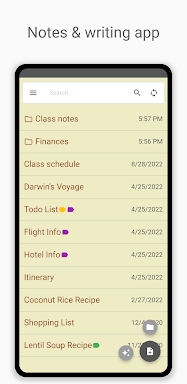
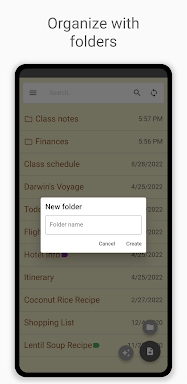
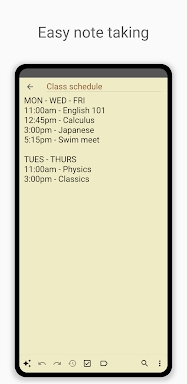
Inkpad Notizblock - Notizen Screenshots
Bewertungen
Post Kommentare
Trendspiele
Trend -Apps




![A Father’s Sins – Going to Hell [Ch. 7 Public] By Pixieblink](https://imgs.39man.com/uploads/67/1719578270667eae9eb6a75.jpg)







Themen
Mehr
Top-bewertete Produktivitätstools zur Steigerung Ihres Workflows
Mind-Bending-Puzzlespiele für Android
Best Productivity Apps to Boost Your Efficiency
Offline -Puzzlespiele, die jederzeit spielen können
Erkunden Sie die Welt der Arcade -Spiele
Beste Casinospiele online
Schönheit Apps: Ihr Leitfaden für atemberaubende Aussehen
Top bewertete Strategiespiele auf Google Play