Description de l’application
Here’s a polished and professional summary of Inkpad Notepad & To-Do List that you can use for marketing, app store descriptions, or user onboarding:
📝 Inkpad Notepad & To-Do List – Stay Organized, Anytime, Anywhere
Keep your thoughts, ideas, and tasks in perfect order with Inkpad Notepad & To-Do List — a sleek, smart, and secure app designed for clarity and productivity.
Whether you're jotting down quick reminders, planning your day with to-do lists, or brainstorming big ideas, Inkpad makes note-taking effortless — all while keeping your data safe and always in sync.
✨ Key Features
✅ Auto-Save Your Work
Never lose a thought. Inkpad automatically saves every note in real time — so your progress is protected, even if the app closes unexpectedly.
✅ Smart Checklists & To-Do Lists
Turn notes into actionable tasks. Mark items off as you go, organize priorities, and stay on track with intuitive checklist management.
✅ Lightning-Fast Search
Find any note instantly with powerful search. Type a keyword, phrase, or even a partial sentence — your notes are just a tap away.
✅ Seamless Cross-Device Sync
Use Inkpad on Android, iOS, and the web. All your notes sync instantly across devices — no manual effort required.
✅ Secure Online Backup & Restore
Your data is protected with end-to-end encryption. Back up securely to the cloud and restore with confidence anytime.
✅ Web Access Anytime
Edit and view your notes from any device using InkpadNotepad.com — no app needed.
✅ AI-Powered Assistant
Get smarter, faster. The built-in AI chat assistant helps you:
- Rewrite and edit notes with better clarity
- Brainstorm ideas and generate content
- Summarize long notes or learn from them
- Translate, expand, or simplify text — all in seconds
🔐 Premium Features (Upgrade for More Control)
- PIN Protection – Lock your notes with a personal PIN for extra privacy.
- Note History – View and restore previous versions of your notes. Never overwrite accidentally again.
🚀 How to Get Started in 5 Easy Steps
-
Download & Install
Get Inkpad from the Google Play Store or Apple App Store. -
Open the App
Launch Inkpad and explore the clean, distraction-free interface. -
Create Your First Note
Tap the "+" button to start writing — type, draw, or add a checklist. -
Use the AI Assistant
Tap the chat icon to ask for help: “Help me rephrase this summary”, “Suggest 5 creative goals for my project”, or “Turn this into a to-do list.” -
Stay Synced & Protected
Sign in to your account to:- Sync notes across all devices
- Enable secure online backup
- Access your notes anytime via InkpadNotepad.com
- Upgrade to Premium for PIN protection and Note History
💬 Why Users Love Inkpad
“It’s like having a personal assistant for my notes — the AI actually helps me write better!”
— Sarah, Freelance Writer
“The sync across my phone, tablet, and laptop is flawless. Plus, the PIN lock gives me peace of mind.”
— James, Project Manager
📱 Download Now & Take Control of Your Productivity
👉 Available on:
- Google Play Store
- Apple App Store
- Web Access: InkpadNotepad.com
Upgrade to Inkpad Premium today and unlock the full potential of smart, secure, and effortless note-taking.
Stay organized. Stay inspired. Stay ahead — with Inkpad.
Let me know if you'd like a shorter version for social media, a promo email, or a feature comparison chart!
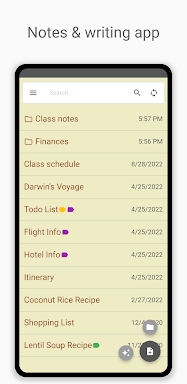
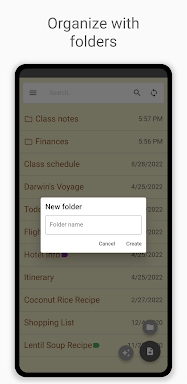
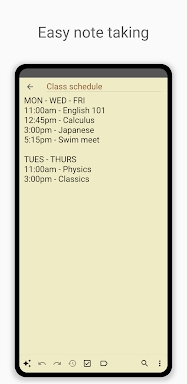
Captures d’écran Inkpad - Notes et listes
Critiques
Publier des commentaires
Jeux tendances
Applications tendance




![A Father’s Sins – Going to Hell [Ch. 7 Public] By Pixieblink](https://imgs.39man.com/uploads/67/1719578270667eae9eb6a75.jpg)







Sujets
Plus
Explorez le monde des jeux de casino
Personnalisez votre Android: les meilleures applications pour la personnalisation
Applications de papier peint uniques pour chaque style
Jeux d'action palpitants pour Android
Top Travel Planning Applications
Les principales applications de productivité pour rationaliser votre flux de travail
Personnalisez votre expérience Android avec ces applications
Explorez le monde des jeux d'aventure de casino
Derniers articles
Plus